WEGnology Agent
The WEGnology Agent is an assistant integrated directly into the WEGnology Platform, whose knowledge is based exclusively on the WEGnology Documentation.
This means that it only answers questions about content described in the documentation.
The Agent does not have access to the private resources of your organization (dashboards, devices, workflows, data, etc.).
It answers questions based exclusively on the public documentation of the Platform.
Where the WEGnology Agent appears in the Platform
Within the WEGnology web application, the Agent is available on every screen as a fixed chat button:
- Positioned in the bottom-right corner of the interface.
- Displayed as a circular icon (chat bubble).
- Visible in the main sections, such as Dashboards, Applications, Organizations, My Account, among others.
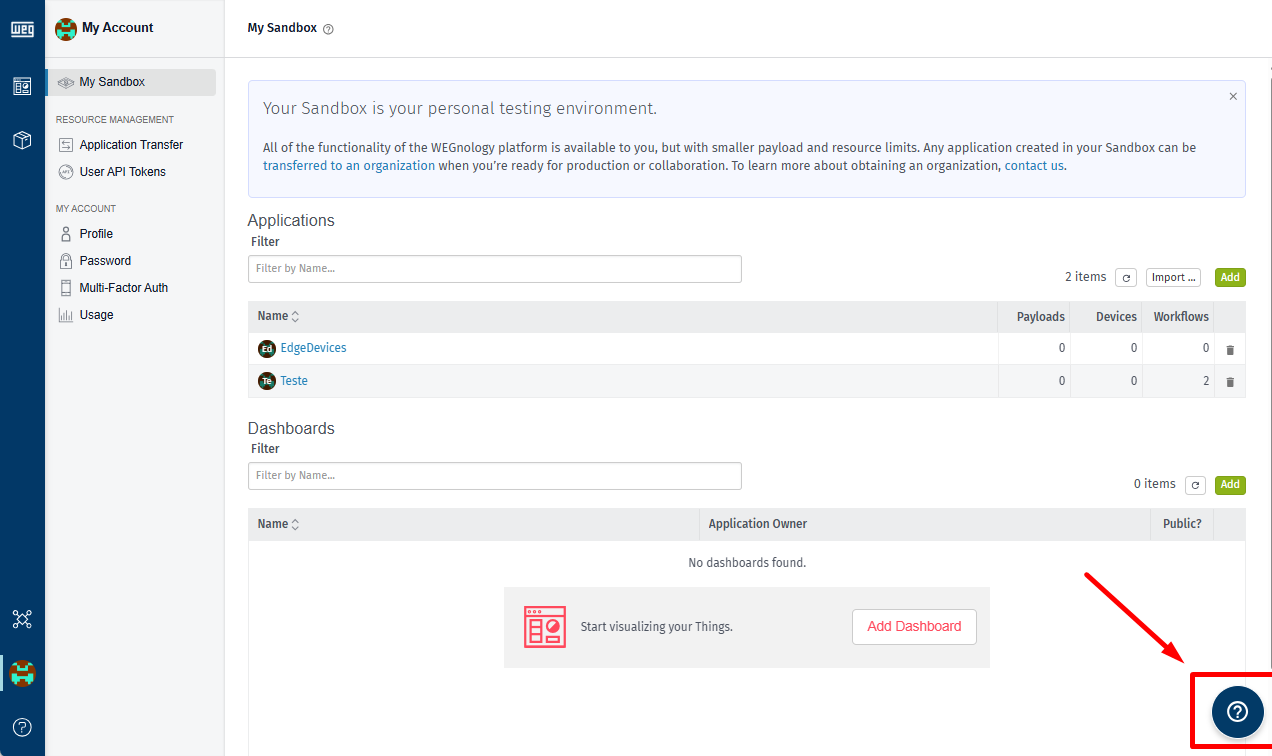
When you click the button, a chat window opens and remains fixed in the bottom-right part of the screen.
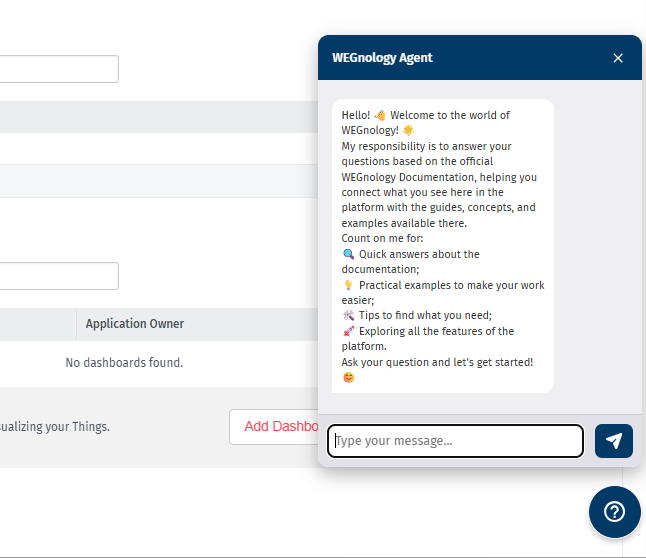
What the WEGnology Agent does
The goal of the WEGnology Agent is to connect what you are seeing in the Platform with the concepts described in the documentation.
You can use it to:
-
Quick answers based on the documentation
Ask about concepts such as devices, dashboards, experiences, data tables, workflows, notifications, etc.
-
Practical examples
Ask for examples of common tasks, for example:
"How do I trigger a workflow from a device state?" or "How do I use a Data Table in a Dashboard?" -
Navigation guidance and use of features
Ask where to configure something, on which screen to find a specific feature, or which documentation page explains a specific topic.
-
Explore Platform features
Discover features you do not know yet, starting with questions like "How do I…?".
Examples of questions you can ask:
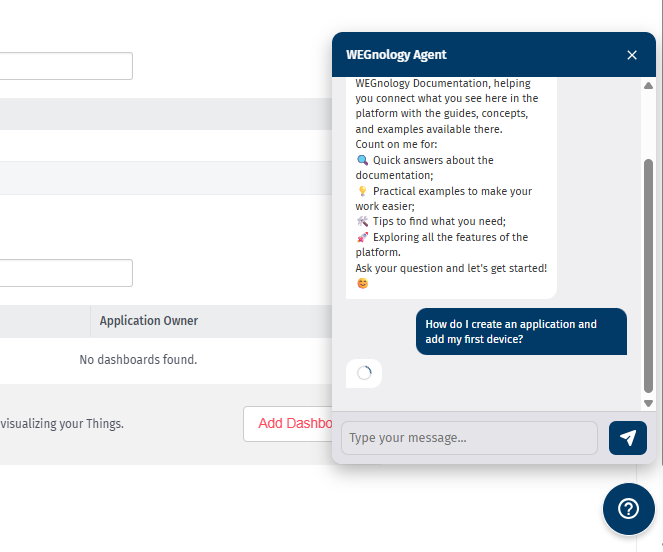
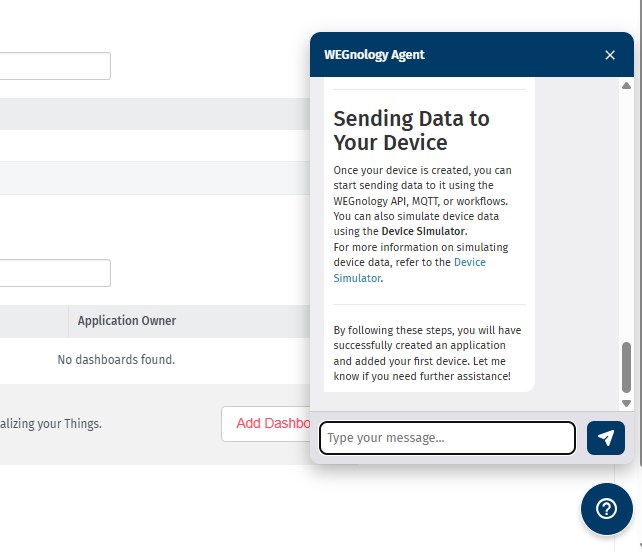
- "How do I create an application and add my first device?"
- "What is the difference between a dashboard and an experience page?"
- "How do I send telemetry data using MQTT?"
- "Where can I see the resource limits of my organization?"
What the WEGnology Agent does not do
To keep the scope clear and protect your organization’s data, the Agent currently does not:
- Access or display private data from your organization, such as:
- Specific dashboards, devices, data tables, workflows, notebooks, or historical data.
- Perform actions on your behalf:
- It does not create resources, does not change configurations, and does not execute workflows.
- Replace official support channels for production incidents or critical issues.
For issues that involve specific data, configuration of your account, or production incidents, use the regular support channels of the platform.
How to use the WEGnology Agent
-
Open the chat
Click the floating button in the bottom-right corner of the application.
-
Read the initial message
The Agent introduces itself and explains that it answers questions based on the WEGnology Platform Documentation.
-
Send your question
Write your question in natural language.
You can ask about concepts, step-by-step instructions, best practices, or where to find something in the docs or in the interface. -
Refine the answer (optional)
If the answer is too generic, ask follow-up questions, for example:
- "Can you give a more concrete example?"
- "Which documentation page explains this in more detail?"
-
Keep exploring
Keep the Agent open while you browse the platform and use it as a "copilot" to clear up questions as they arise.
Context, session, and privacy
The WEGnology Agent internally maintains a conversation context (for example, a user identifier and a thread identifier) in order to:
- Maintain continuity between messages within the same session;
- Improve the relevance of answers in follow-up questions.
This context is used only to enable the assistant’s functionality and does not grant the Agent access to your organization’s private data.
Limitations and feedback
The WEGnology Agent is continuously evolving. In some cases, you may encounter:
- Answers that are incomplete or too generic;
- Information that does not yet reflect very recent changes in the interface or features;
- Situations where the Agent does not find a good answer in the documentation.
When this happens:
- Check the links and references to the documentation suggested by the Agent;
- Submit feedback through the usual WEGnology support/feedback channels so that we can:
- Improve the assistant’s behavior;
- Improve the WEGnology Platform Documentation itself.
Was this page helpful?
Still looking for help? You can also search the WEGnology Forums or submit your question there.